
Introduction
When you see “Model Quality 99% / 99.9%” in a backtest, it’s just a proxy for how well the tester reconstructed fine price movements (ticks). It does not mean “profit accuracy = 99%.” Don’t take the number at face value—judge whether a system looks robust in real life using the points below.
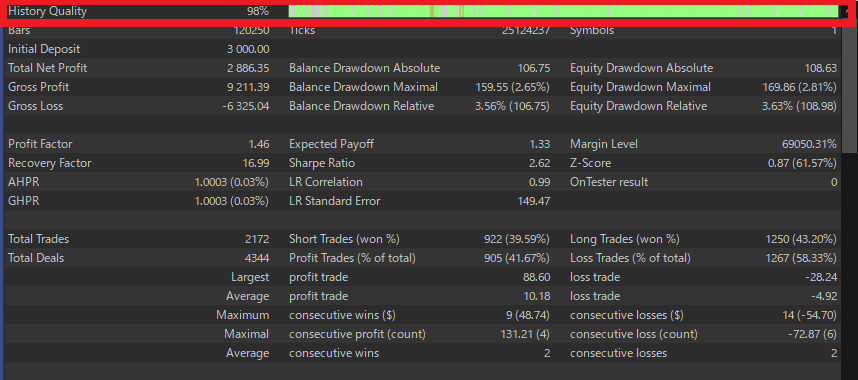
Modeling modes (and what they’re good for)
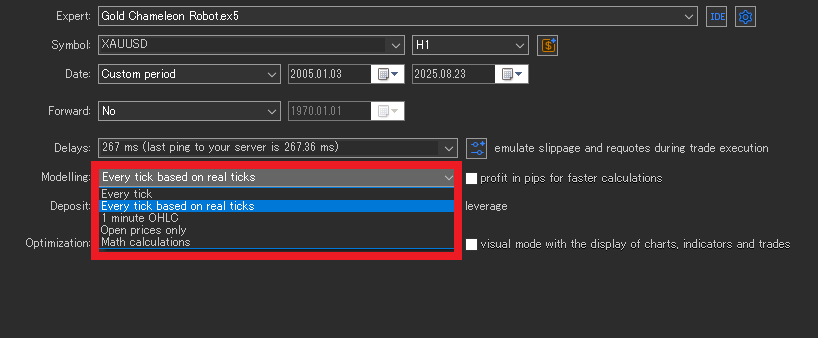
Every tick (real ticks)
Replays actual Bid/Ask ticks from history. It reflects spread widening and wicks better, but results can shift across brokers/data sources.
Use when: ultra-short scalpers where a few pips decide outcomes.
Note: Many EAs don’t need this level of precision.
Every tick (generated from M1)
Builds “synthetic ticks” from 1-minute OHLC. Flash moves and extreme wicks get smoothed, so it’s weak for scalping evaluation.
Use when: getting a high-level view for day-trade to swing EAs.
1-minute OHLC (M1 OHLC)
Decisions use only each minute’s open, high, low, close. The in-bar order of price moves is lost.
Use when: entries/exits happen on ≥M1 and stops/takes are not razor-tight.
Open prices only
Evaluates on each bar’s first price only. In-bar movement is ignored, so stop/limit, trailing, fine TP/SL logic won’t be modeled well.
Use when: H1+ bar systems that act only on bar close—rough, sanity-check runs.
Rule of thumb: the more scalpy the EA, the closer you should model to “Every tick (real ticks)”. The more swing-oriented, the more you can get away with rougher modes for a first pass.
Spread, commissions & slippage (the “realism” layer)
Spread
Spreads expand during news and thin liquidity. Testing at a fixed 1.0 pip can be too kind; live will often be worse. Prefer wider settings and/or time-varying spreads to cover “bad” cases.
MT5 setup notes
- In the tester, click the
$(symbol properties) next to the symbol name, enable “Use custom symbol settings”, then enter Spread (points) manually. - Default is floating (uses the broker’s historical variable spreads). These histories can be unusually tight; setting a manually wider spread is safer.
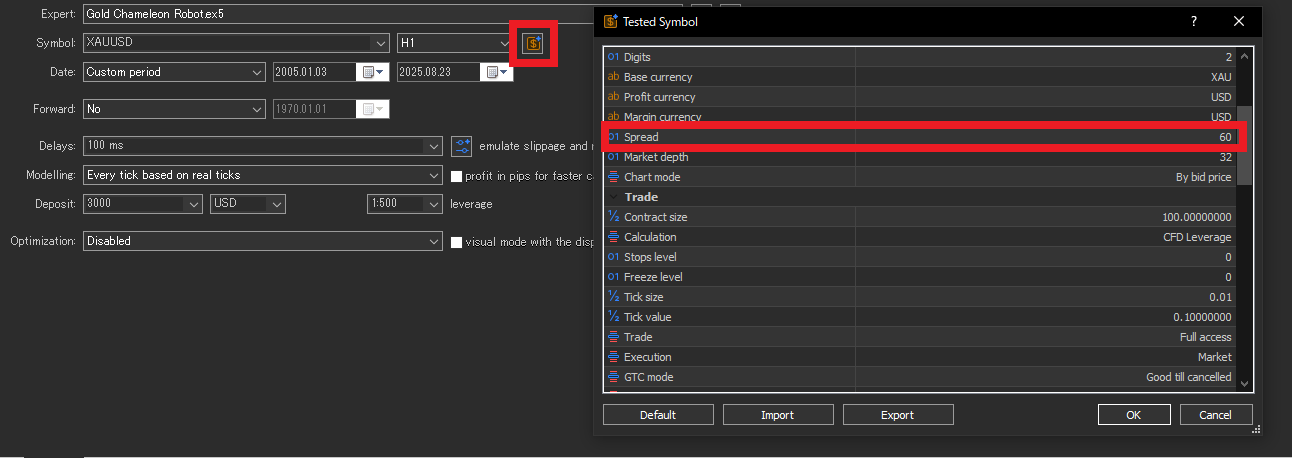
When does your manual spread actually apply?
- Every tick (real ticks): Generally not applied. The tester uses recorded Bid/Ask (i.e., variable real spreads). If you want tougher conditions here, raise commissions and add delay/slippage.
- Every tick (from M1) / M1 OHLC / Open prices only: Applied. Your manual fixed spread (points) is used (e.g., to derive Ask).
Commissions
Match your broker’s scheme (per side/round-turn, per lot/notional, currency). If omitted or wrong, PF and expectancy are inflated.
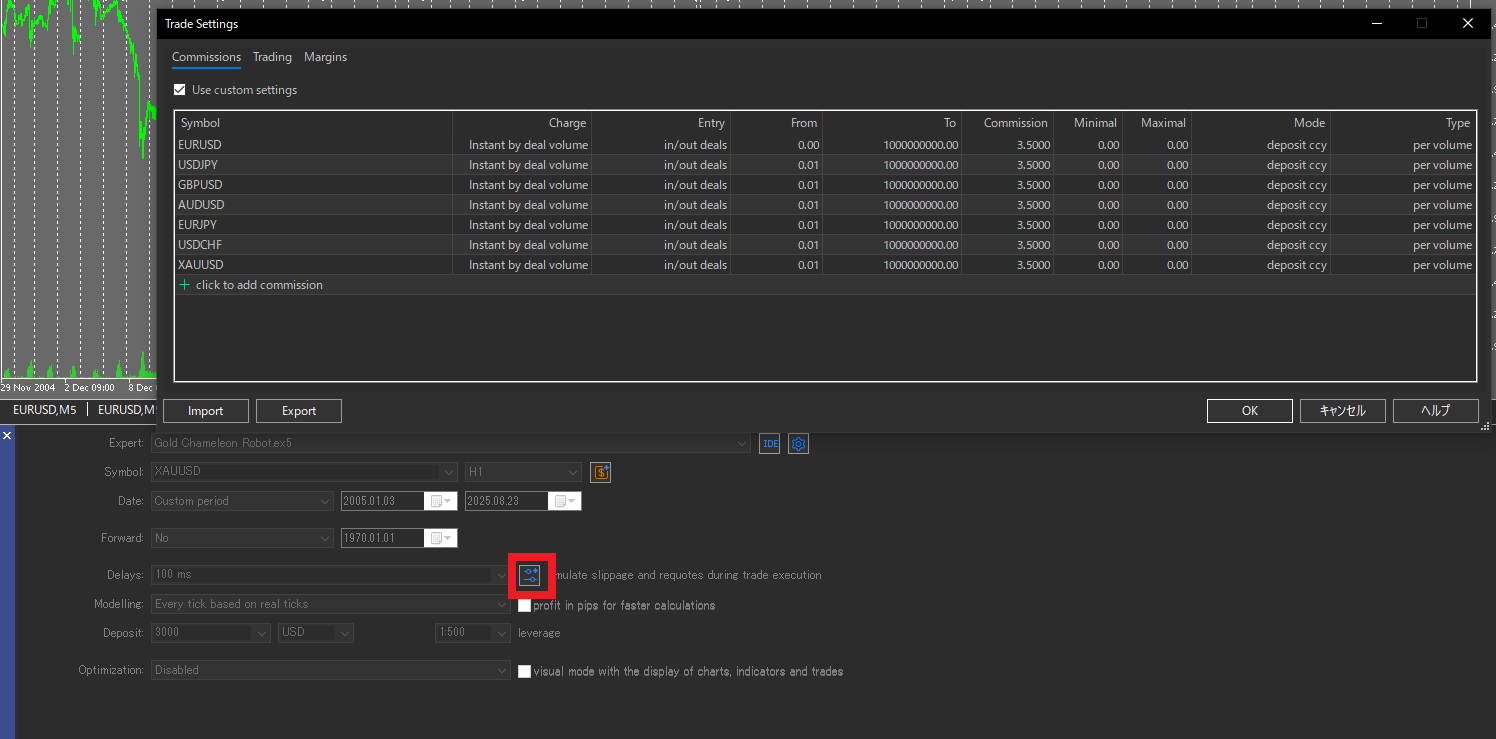
Slippage & execution delay
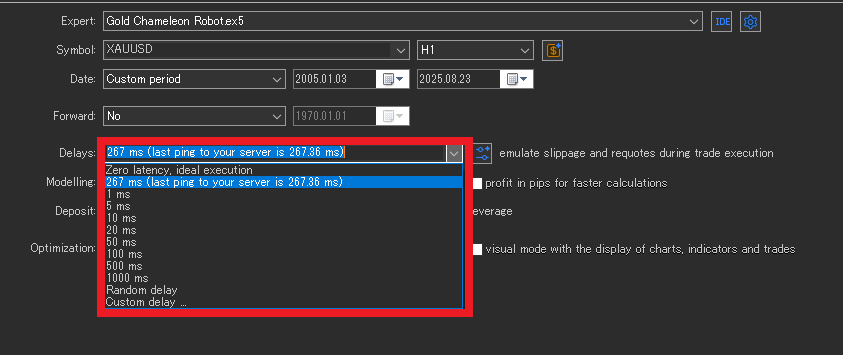
Testers often under-slip vs live. Don’t set execution delay shorter than your real server ping (ms). Run worse-case scenarios (wider spreads, added delay) to check the EA doesn’t break.
Tick data caveats (hidden traps inside “99%”)
- Broker differences: quote precision, tick rules, contract specs vary → results move. Align tests with your actual live account.
- Outliers/gaps: spikes and weekend gaps can swing P/L depending on handling. Check for weird bars.
- Time zones/DST: server time shifts change daily cutoffs and week closes. Keep test and live on the same time basis.
Choosing the test period (don’t cherry-pick)
- Include a mix of trend/range, high/low volatility regimes.
- Cover crash/shock phases (COVID, war headlines, flash crashes, etc.).
- If possible, review longer spans (e.g., 10–20 years) for robustness.
- As a stability cue, aim for ≥ 500 trades on the same logic (ideally ≥ 1,000).
Limits of “99% quality”
- Real execution effects (thin books, requotes, partial fills) can’t be fully replicated.
- VPS latency, terminal load, and human actions (manual stops/lot changes) are out of scope.
Bottom line: treat backtest quality as a reference, not a guarantee.
What beginners should actually do
- Pick EAs that don’t hinge on tiny ticks. Extreme scalpers (1–few pips edge) or “wick-sensitive” logic depend too much on modeling quirks. Prefer EAs with longer bars, clear logic, and positive RR—they’re less likely to drift live.
- Prefer EAs with verified live forward results. Public real-account tracking (e.g., Myfxbook verified). Demos and backtests are reference only.
- Run your own backtests. Vendor tests may fit one broker’s data or understate costs. Test with your broker settings. If an EA blocks user testing, that’s a red flag.
- Check that live P/L “behaves the same way” as the backtest. On a monthly basis, compare win rate, Avg win/loss (RR), PF, Max DD. They should sit in a similar range. If backtest climbs but live doesn’t, re-check costs, hours, broker.
- Retest under tougher conditions. Wider spreads, added slippage, exclude news windows—make sure the EA doesn’t collapse.
- Be skeptical of “too perfect” curves. Sky-high PF, standout win rate, near-zero DD may signal grid/martingale or overfitting. See “optimization traps” to spot these.
Summary
- 99% quality = tick reconstruction, not “99% profit certainty.”
- From a user’s view, the safest path is to choose EAs less sensitive to micro-ticks and with real-account forward history.
- Treat demo/backtests as reference; ultimately verify that your live P/L pattern matches the backtest’s way of making money.
FAQ
What does “Model Quality 99% / 99.9%” actually measure?
It measures how well the tester reconstructed fine price movements (ticks). It is not a guarantee that profits are “99% accurate.” Use it as a reference, not a promise of live performance.
Which modeling mode should I pick for my EA?
For ultra-short scalpers where a few pips decide outcomes, use Every tick (real ticks). For day-trade to swing systems, Every tick (from M1) or M1 OHLC is often sufficient for first-pass evaluation. For H1+ bar-close systems, Open prices only can be used for rough sanity checks.
Does the manual spread I set in MT5 apply to “Every tick (real ticks)”?
No. Real-tick mode uses recorded Bid/Ask (variable spreads). Manual fixed spread applies to Every tick (from M1), M1 OHLC, and Open prices only. To “toughen” real-tick tests, increase commissions and add execution delay/slippage.
How should I set spread, commissions, and slippage for realistic tests?
Err on the conservative side: use wider spreads (or floating historical spreads + extra margin), match your broker’s commission scheme and currency, and set execution delay no shorter than your real server ping. Also run worse-case scenarios to ensure the EA doesn’t break.
Why can backtest results change across brokers or data sources?
Tick precision, quote filters, contract specs, and server time zones/DST differ by broker. These shift entry/exit prices and how outliers (spikes, weekend gaps) are handled, moving P/L. Align tests with the broker/account you actually plan to trade.
How long should my test period be, and how many trades do I need?
Cover mixed regimes (trend/range, calm/volatile) and include stress phases (flash moves, news shocks). If possible, use 10–20 years of data. As a stability cue, target ≥ 500 trades on the same logic (ideally ≥ 1,000).
How do I verify that live performance “behaves like” the backtest?
Compare monthly win rate, average win/loss (RR), profit factor, max drawdown between live and backtest. They should sit in similar ranges. If backtest climbs but live lags, re-check costs, trading hours, broker, and latency/execution assumptions.
Are demo and backtests enough to judge whether an EA is good?
No. Treat them as references. Prefer EAs with verified real-account forward results (e.g., public tracking). Retest yourself with your broker settings; if an EA blocks user testing, consider it a red flag.
What kind of EAs are safer for beginners?
Avoid systems whose edge depends on micro-ticks (extreme scalpers or wick-sensitive logic). Favor EAs that operate on longer bars with clear rules and positive risk-reward; they tend to drift less from backtest to live.